02鸿蒙-HarmonyOS-应用开发入门


1.组件

页面所展示出来的文本框,按钮等展示的元素都是组件。

注意:组件在未被添加到布局中时,既无法显示也无法交互,因此一个用户界面至少要包含一个布局。

如:按钮组件、图片组件、文本框组件、文本输入框组件、进度条组件,音量滑块组件,单选框组件。

分类:显示类组件(图片组件,文本组件,进度条组件等)、交互类组件(按钮组件,输入框组件,多选框组件,单选框组件,滑块组件等)、布局是容器类的组件
父类:Component(包括布局)

1.1显示类组件

1.1.1文本组件(text)

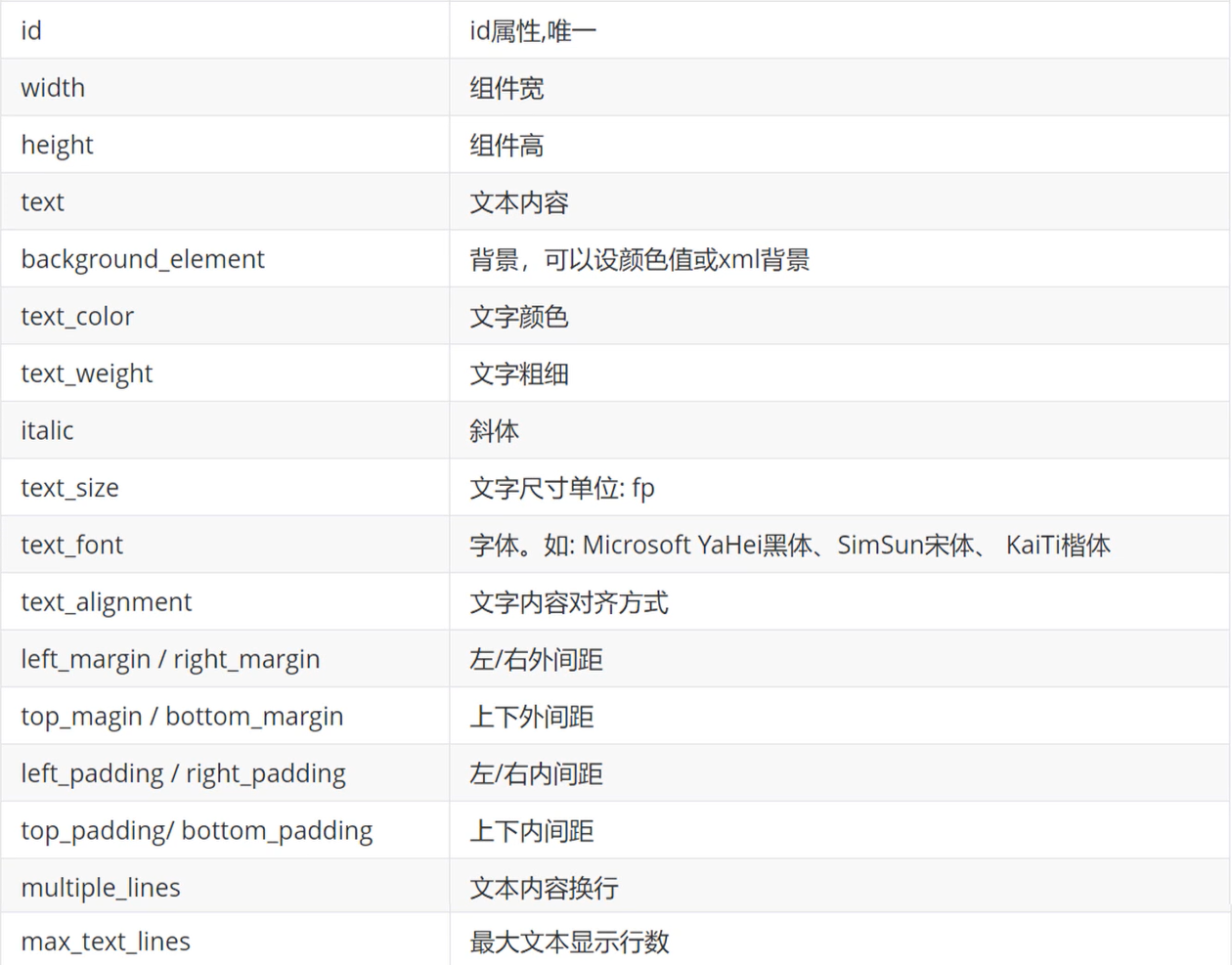
  1. 常见属性说明:

    image-20210821220040401

    image-20210821220115424

特别说明属性值说明:

  • 宽高属性

    1. match_content 包裹内容

    2. match_parent 填充父元素

    3. 或者具体数值单位

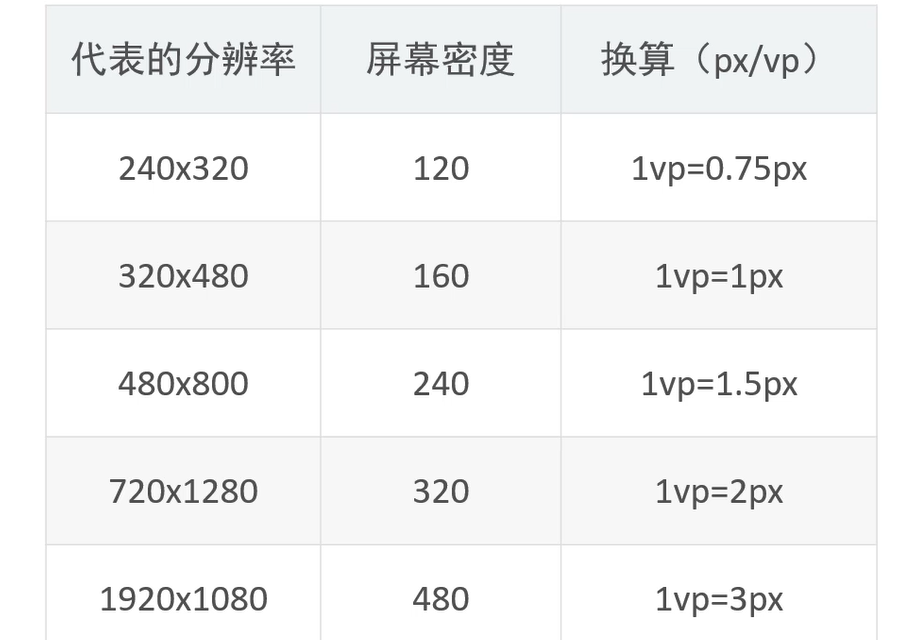
      3.1 px(像素):固定的

      3.2 vp(虚拟像素):宽高
      vp = (px160)/PPI:
      PPI:屏幕像素点密度(Pixels Per Inch):对角线像素点个数/屏幕尺寸:每英寸有多少个像素点.
      例:假如要在布局上设置width为100px的组件,则vp=(100px
      160)/PPI

      3.3 fp (像素):文字大小

image-20210823134537061

  • 颜色属性:
  1. 三元色:[透明度]红绿蓝
  2. 范围:0~255
  3. 表示方法:十六进制(#00917643)注:两两一样时可以省略为一个
  • 位置属性
  1. 边距
    1.1 外边距(margin、top_margin、bottom_margin、left_margin、right_margin)
    组件边框外侧距离其他组件的距离。
    如果组件外侧没有其他组件,则是到父布局的距离。
    1.2. 内边距(padding、top_padding、botton_padding、left_padding、right_padding)
    组件边框的内侧和文本之间的间距。
    一般设置上左就行了。
  • 展示大段文字
  1. 文字过长自动换行
    ohos:multiple_lines=”true”(自动换行)
    ohos:max_text_lines=”1” (文本最大行数)
  2. 文字过长省略开头
    ohos:truncation_mode=”ellipsis_at_start”
  3. 文字过长省略结尾
    ohos:truncation_mode=”ellipsis_at_end”
  4. 文字过长省略中间
    ohos:truncation_mode=”ellipsis_at_middle”
  5. 跑马灯效果
    ohos:truncation_mode=”auto_scrolling”(文本允许自动滚动)
    ohos:auto_scrolling_count=”unlimited”(滚动次数)
    ohos:auto_scrolling_duration=”2000”(滚动速度)
    text.startAutoScrolling();(开启跑马灯效果)

    1.1.2图片组件(Image)

    属性介绍:
    background_element(背景图片)
    image_src(展示图片|前景图片)
    clip_alignment(裁剪方式)
    scale_mode(缩放模式)

2.布局

多个组件摆放的方式就是布局,组件必须添加到布局中才能够显示出来。

3.事件

就是可以被组件识别的操作。
常见的事件:单机、双击、长按、滑动

3.1单击事件

单击事件又叫做点击事件。是开发中使用最多的一种事件没有之一。
实现步骤:

  1. 通过id找到组件
  2. 给按钮组件设置单击事件
  3. 写一个类实现clickedListener接口并重写onClick方法
  4. 编写onclick方法体
    四种方式:
  • 匿名内部类
    1
    2
    3
    4
    5
    6
    7
    8
    9
    10
    11
    12
    13
    button = (Button) this.findComponentById(ResourceTable.Id_btn1);
    //this:本类的对象。子界面对象。
    //用this调用方法,this可以省略不写
    //返回的是一个组件父类对象需要向下转型。
    // 为按钮设置点击事件回调
    button.setClickedListener(new Component.ClickedListener() {
    @Override
    public void onClick(Component component) {
    // 此处添加点击按钮后的事件处理逻辑
    //Componet:所有组件的父类
    button.setText("已点击");
    }
    });
  • 自定义实现类
    1
    2
    3
    4
    5
    6
    7
    8
    class MyListener implements Component.ClickedListener{

    @Override
    public void onClick(Component component) {
    Button button= (Button) component;
    button.setText("已点击");
    }
    }
  • 当前类做实现类
1
2
3
4
5
6
7
8
9
10
11
12
13
14
15
16
17
18
19
20
21
22
23
24
25
26
27
28
29
30
31
32
33
34
35
36
37
38
39
40
41
42
43
44
45
46
47
48
49
50
51
52
53
54
55
56
package com.example.myfirstapplication.slice;

import com.example.myfirstapplication.ResourceTable;
import com.example.myfirstapplication.SecondAbility;
import ohos.aafwk.ability.AbilitySlice;
import ohos.aafwk.content.Intent;
import ohos.aafwk.content.Operation;
import ohos.agp.components.Button;
import ohos.agp.components.Component;


public class MainAbilitySlice extends AbilitySlice implements Component.ClickedListener {
Button btn;
@Override
public void onStart(Intent intent) {
super.onStart(intent);
super.setUIContent(ResourceTable.Layout_ability_main);
//1.找到按钮_id
btn= (Button) findComponentById(ResourceTable.Id_but1);

//2.给按钮添加一个点击事件,执行本类的oncLick方法
btn.setClickedListener(this);
}

@Override
public void onActive() {
super.onActive();
}

@Override
public void onForeground(Intent intent) {
super.onForeground(intent);
}

@Override
public void onClick(Component component) {
//因为页面中有很多按钮,每个按钮做的事写在一个if里
if(component == btn){

//创建一个包含页面跳转一系列操作的意图对象
Intent intent=new Intent();
Operation operation = new Intent.OperationBuilder().withDeviceId("")//要跳转到哪个设备
.withBundleName("com.example.myfirstapplication")//应用
.withAbilityName(SecondAbility.class).build();//页面

//把打包之后的Operation设置到意图当中
intent.setOperation(operation);
//跳转页面
startAbility(intent);

}


}
}

  • 方法引用
    1
    2
    3
    4
    5
    6
    7
    8
    9
    10
    button = (Button) findComponentById(ResourceTable.Id_btn1);
    //方法引用
    button.setClickedListener(this::onclick);
    //注意返回值类型以及形参类型
    public void onclick(Component component) {
    Button button = (Button) component;
    button.setText("已点击");

    }

3.2双击事件

1
button.setDoubleClickedListener(this::onDoubleClick);

3.3长按事件

1
2
//方法引用
button3.setClickedListener(this::onclick3);

3.4滑动事件

包括三个动作:按下不松(按下位置),移动,松开(松开位置)

1
2
3
4
5
6
7
8
9
10
11
12
13
14
15
16
17
18
19
20
21
22
23
24
25
26
27
28
29
30
31
32
33
34
35
36
37
38
39
40
41
42
43
44
public class FouthAbilitySlice extends AbilitySlice {
Text text;
int count;
@Override
public void onStart(Intent intent) {
super.onStart(intent);
super.setUIContent(ResourceTable.Layout_ability_fouth);
// 先找到布局对象
DirectionalLayout dl= (DirectionalLayout) findComponentById(ResourceTable.Id_dl1);

text = (Text) this.findComponentById(ResourceTable.Id_text1);
// 添加滑动事件
//当我们在整个布局滑动的时候就会调用onTouchEvent方法
dl.setTouchEventListener(this::onTouchEvent);

}

public boolean onTouchEvent(Component component, TouchEvent touchEvent) {
count++;
//参数1:component表示滑动的那个组件:布局也是组件
//参数2:touchEvent动作对象(按下,滑动,抬起)
int action=touchEvent.getAction();
//1 表示按下
//2 表示松开
// 3.移动滑动
if (action==POINT_MOVE){
//滑动
text.setText("滑动"+count);

}
else if(action==PRIMARY_POINT_DOWN){
//按下
text.setText("按下"+count);

}else {
//松开
text.setText("松开"+count);

}
//由此说明滑动事件是不断地调用ontouchEvent方法的
return true;

}
}

上下左右滑动松开时滑动方式检测

1
2
3
4
5
6
7
8
9
10
11
12
13
14
15
16
17
18
19
20
21
22
23
24
25
  //获取按下时手指的位置(坐标)
MmiPoint pointerPosition = touchEvent.getPointerPosition(0);

x2 = pointerPosition.getX();

y2 = pointerPosition.getY();
text.setText("滑动"+count);
text.setText(x2+"----"+y2);

if (x2-x>0 && Math.abs(y2-y)<=50){
text.setText("右滑");
}
else if(x2-x<0 && Math.abs(y2-y)<=50){
text.setText("左滑");
}
else if (y2-y>0 && Math.abs(x2-x)<=50){
text.setText("下滑");
}
else if (y2-y<0 && Math.abs(x2-x)<=50){
text.setText("上滑");
}
else{
text.setText("没动");
}

public boolean onTouchEvent(Component component, TouchEvent touchEvent)
如果返回值为true,表示所有的动作都会触发当前方法并且执行对应的代码。
如果返回值为false,表示只有第一个动作会出发当前方法并执行对应代码。后续的动作就不会触发当前方法了。(按下–移动-松开只有按下时会触发一次。)



文章作者: 哈雅布撒
版权声明: 本博客所有文章除特別声明外,均采用 CC BY 4.0 许可协议。转载请注明来源 哈雅布撒 !
  目录